
Chrome extension
Body doubling Chrome extension: a focus timer in your side panel
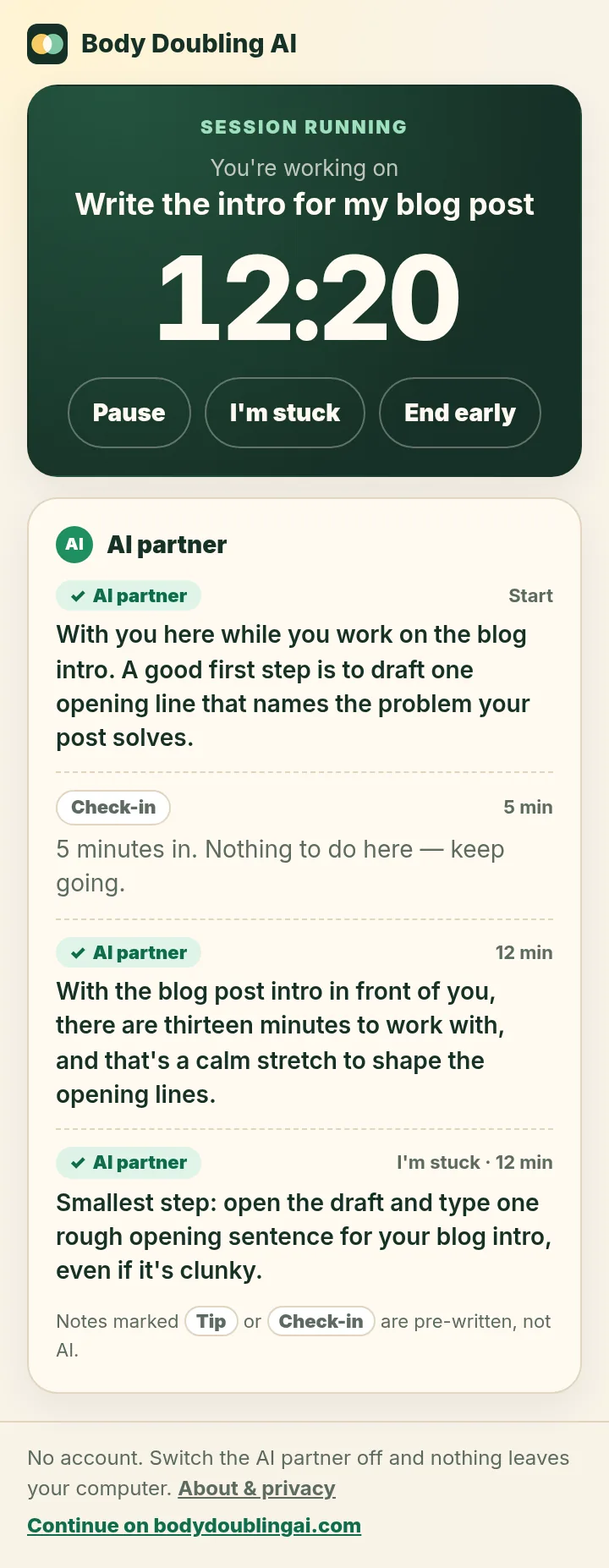
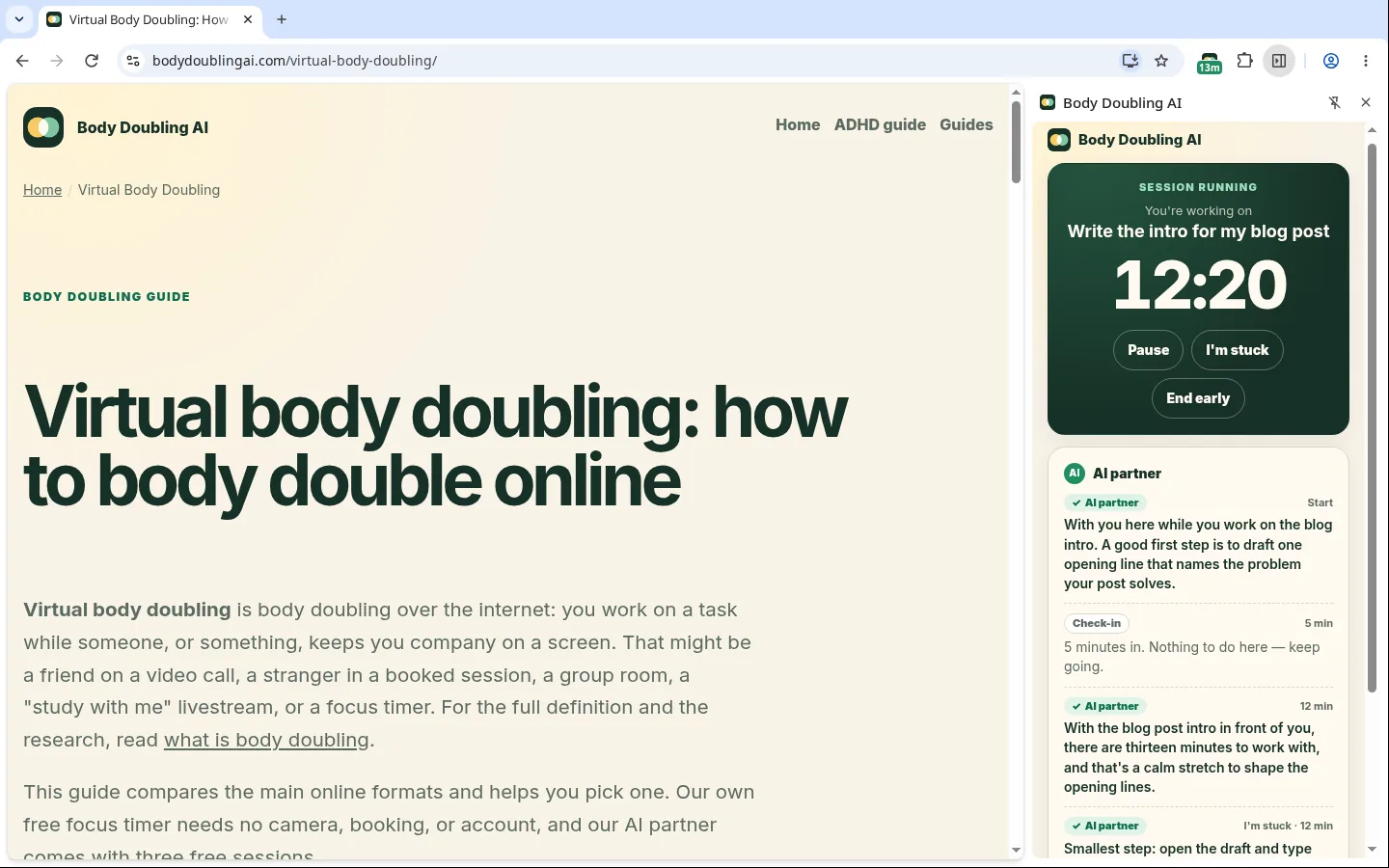
Body Doubling AI for Chrome is the focus timer from this site, in Chrome's side panel. Click the toolbar icon and it opens on the right of your window, then stays there while you switch tabs and browse, so it keeps you company for the whole session. Type one task, pick 25 minutes, 50 minutes or a 5-minute trial, and start. The minutes left also show on the extension's icon. When time is up, Chrome shows a notification. Starting with version 3, every session you finish adds to a count of sessions you finished on this computer.
The AI partner is on by default. Its notes collect in one card, each with its time: a first step for your task when you start, a check-in at the midpoint, and a closing line after a completed session. Press "I'm stuck" and it suggests one small next step. Lines marked "Tip" or "Check-in" are pre-written, so you can always tell them apart. You can switch the AI partner off on the side panel's start screen, and the timer works the same without it.
Free, with no account. How to install it takes about a minute.
Pro applies to the website; the extension stays free at 10 a day.
What the extension does
- One task, one timer. Type what you are working on and choose 25 minutes, 50 minutes or a 5-minute trial.
- A side panel that stays open. The timer sits on the right of your browser while you work in your tabs. The badge on the toolbar icon shows the minutes left, so you can also close the panel; the timer keeps going.
- An "I'm stuck" button. With the AI partner on, the first two presses in a session get one small next step written for your task. After that, or without the AI partner, you get a different pre-written tip each time.
- A notification when time is up. Open the side panel to save your next step, and it will be waiting next time.
- A count of finished sessions (from version 3). Starting with version 3, the extension shows a count of sessions you finished on this computer. A session counts when the timer runs to the end, or when you end it early after at least 5 minutes of focus. Days without a session don't reset anything. (Version 2 counted days in a row instead.)
- An AI partner, on by default. Its notes collect in one card with their times: a first step when you start, a check-in at the midpoint (sessions of 5 minutes or more), help when you press "I'm stuck", and a closing line after a completed session, when you can tell it how it went. It comes with 10 free sessions a day of its own, apart from the website's. If it cannot be reached, you see the pre-written lines and the timer carries on.
Prefer not to install anything? The same timer runs on our homepage: start a session in this tab.
How to install it in Chrome
- Download bodydoublingai-extension-v3.zip.
- Unzip it. On Windows, right-click the file and choose Extract All. On a Mac, double-click it. You get a folder named
bodydoublingai-extension-v3with a file calledmanifest.jsoninside. Put the folder somewhere it can stay, such as your Documents folder. - Open the extensions page. Type
chrome://extensionsin Chrome's address bar and press Enter. - Turn on Developer mode with the switch in the top-right corner.
- Click Load unpacked and choose the folder that contains
manifest.json. - Pin it and open it. Click the puzzle-piece Extensions button next to the address bar and pin Body Doubling AI, so you can see the countdown. Then click its icon: the side panel opens on the right.
Why Developer mode? The extension is not on the Chrome Web Store yet, and Chrome only installs an extension from a folder on your computer when Developer mode is on. Chrome runs it from the folder you chose, so don't delete or move that folder: if it is gone, Chrome can no longer load the extension.
Updating to a new version
- Download the new zip from this page and unzip it.
- Copy all of its files into the folder you installed from, replacing the old files.
- Open
chrome://extensionsand click the reload arrow on the Body Doubling AI card.
The extension keeps the same ID from version to version, so your session count, your saved next step and the AI partner switch stay as they were.
Coming from version 2? The new zip unzips to a folder named bodydoublingai-extension-v3. Copy the files from inside it into the folder you loaded version 2 from (don't load the new folder as a second copy), then reload the card. Sessions you finished with version 2 are already in your count.
Privacy in short
- No account and no sign-up. Your sessions, next step and session count are saved in Chrome's extension storage on your computer; removing the extension deletes them.
- While the AI partner is on, the extension sends a request to our server when a session starts, at its midpoint, when you press "I'm stuck" and when a session is completed: your task, the planned minutes and the minutes so far, at the end only your answer to "How did it go?" if you write one, and random IDs (one for the session, one made when the extension was installed). Our server passes the text to a third-party AI provider, which writes the notes. We don't store your task, your note or the partner's notes. To count your free sessions we keep only a salted hash of the install ID (and of your IP address), never the IDs themselves.
- With the AI partner switched off, the extension sends nothing over the network.
- It cannot read the pages you visit, and it has no ads or tracking scripts.
The full details, including the AI provider and what we keep, are in our privacy policy and on the extension's own About & privacy page.
Please don't type health details or other sensitive information into your task or note. This is a focus timer, not medical advice or treatment.
Chrome extension FAQ
Is the Chrome extension free?
Yes. The focus timer is free, with no account and no sign-up. In the extension the AI partner comes with 10 free sessions a day of its own, counted apart from the website's 5 free sessions a day, so using one doesn't use up the other. To stop abuse, one network can start at most 15 AI partner sessions a day across the extension and the website together. When they are used up, the timer keeps working with its pre-written check-ins. They come back at midnight UTC. Pro applies to the website; the extension stays free at 10 a day.
Why isn't it on the Chrome Web Store yet?
For now we offer it as a zip file that you install yourself, with Chrome's Developer mode on. If it comes to the Chrome Web Store later, we will say so on this page.
Does it work offline?
Yes, the timer does. The countdown, the end-of-session notification, the "I'm stuck" tips, your next step and your session count all work on your computer without a connection. The AI partner's notes need the internet; when it cannot be reached, you see the pre-written lines instead and the timer carries on.
Does it stay open while I browse?
Yes. Click the toolbar icon and the timer opens in Chrome's side panel, on the right of the window. It stays there while you switch tabs and open pages, until you close it. The minutes left also show on the icon, so the timer keeps going when the panel is closed.
Which browsers does it work in?
Chrome 116 or later, on a computer. Edge, Brave and other Chromium-based browsers should work the same way: install it with Load unpacked from their extensions page (edge://extensions or brave://extensions) with Developer mode on. It does not work in Firefox or Safari.
Is this medical advice?
No. Body Doubling AI is a focus timer, not medical advice or treatment.